
Should You Trust Online Image Compression Tools With Your Photos?
Free online image compressors are used heavily because they're quick and require no install. The files being uploaded often contain GPS coordinates, timestamps, device information, and identifiable faces - all of which end up on a server run by a third party. Whether that's a problem depends on what's in your images and what the tool's privacy policy actually says.
The Lifecycle of Your Upload
The basic mechanics are simple. When you upload a photo to an online compression tool, that file travels from your browser to a remote server. The server receives your image, runs its compression algorithm, stores the result, and sends back a download link. Pretty straightforward.
The critical moment occurs in between: your original file now exists on a third-party server. Reputable tools claim to delete these files within a specific window.
The problem with deletion claims is that you have no way to verify them. When a company promises to wipe your data after an hour, you are relying entirely on faith. Without an audit or a technical receipt, there is no proof your photo was actually removed from their storage arrays rather than being captured by a backup system or retained in a log. You simply don't know.
What the Privacy Policies Actually Say
A review of popular image compression tools reveals mostly standard language regarding usage data and cookies. However, some policies contain clauses worth flagging. Certain tools include terms granting them a royalty-free license to uploaded content for the purpose of improving their services.
This language is broad enough to potentially allow a company to train machine learning models using your photos, and some smaller tools have no privacy policy at all. They exist as simple upload boxes in an unaccountable corner of the internet. Other services mention that files are processed by third-party infrastructure providers, meaning your images touch more servers than you might expect.
The better tools are explicit about what they avoid. They state clearly that they don't look at your images, train models on them, or share them with others.
☞ Note: Some compressors (including imagecompressor.com) run entirely in the browser using WebAssembly, so the files are never uploaded anywhere. If privacy matters for your use case, look for tools that make this explicit in their privacy policy.
EXIF Metadata Gets Uploaded Too
Most photos taken on smartphones contain EXIF metadata. This includes the camera model, exposure settings, and the date and time. Often, it also includes precise GPS coordinates. Your phone quietly geotags every photo you take unless you have specifically disabled that feature.
When you upload a photo to a compression tool, you aren't just sending a picture. You are sending that image plus the exact latitude and longitude of the location. You are also providing the date, time, and the specific device you used.
Many compression tools strip this metadata during processing, and some even advertise this as a feature. However, the stripping happens after the upload. The server receives the full, metadata-rich file first. If someone intercepts that upload or the server is compromised, your metadata is exposed.
This might not matter for casual snapshots intended for a blog post. It's a different story for sensitive personal photos, images from a confidential work project, or pictures that reveal locations you want to keep private. In those cases, it's worth thinking twice.
The Case for Client-Side Tools
Some compression tools work entirely within your browser, so the image never leaves your computer. Instead, the compression algorithm runs locally using JavaScript or WebAssembly, which then processes your file in the browser's memory and sends back the result. The server delivers the webpage and the code, but your actual photos never touch it.
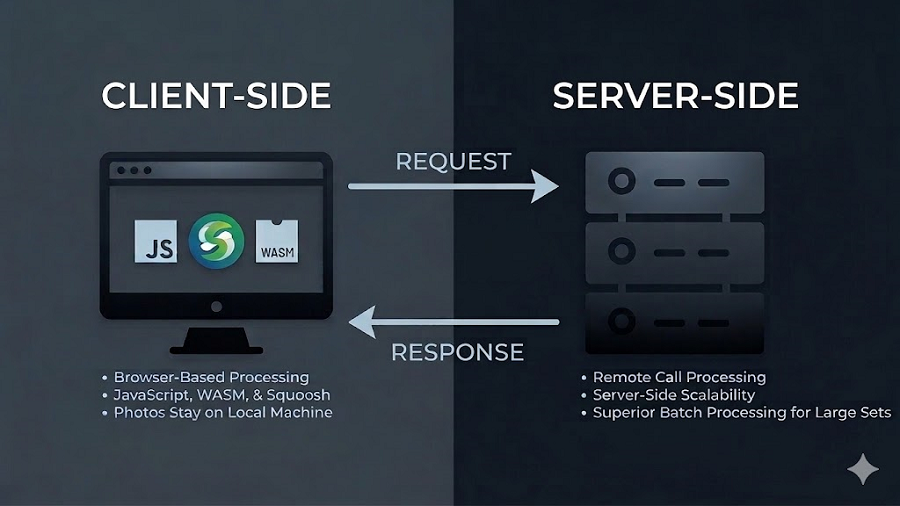
The tradeoff involves speed and scale. Client-side tools rely on your device processing power instead of a high-performance cloud server. While you won't notice a difference for a few images, you might if you try to batch-process 500 product photos at once. For the privacy-conscious, the performance hit is worth the peace of mind. You get the convenience of a web-based tool without the trust issues because your photos go nowhere.
Red Flags Worth Watching For
A few patterns are worth flagging when you're evaluating these tools. The most obvious warning sign is the absence of a privacy policy. Some smaller compression services offer nothing but a drag-and-drop box with no legal text anywhere on the site. Since it costs nothing to post a policy, omitting one is a deliberate and unsettling choice.
You should also check for HTTPS in your browser address bar. If a site lacks this encryption, your images are transmitted in plain text, allowing anyone on the same Wi-Fi network to intercept them. There is no excuse for this in 2026, yet the flaw still exists on several smaller platforms.
A subtler red flag is requiring an account for basic tasks. Some tools won't compress a single JPEG without a verified email address, which they often use for marketing or data linking.