
Progressive JPEGs: The Forgotten Optimization That Still Matters
Even with compression, dimensions, and a CDN all in order, a hero image can still feel sluggish on first paint. One of the cheapest fixes for this is also one of the oldest: encoding the JPEG in progressive mode. Progressive JPEG has been part of the format since 1992, but it's often skipped or disabled in modern encoders.
Baseline vs Progressive Rendering
A standard baseline JPEG loads the way you would read a book: top to bottom, left to right. The browser renders each row of pixels in sequence. If the connection is slow, you get a familiar curtain-drawing effect where the top half of the image is visible while the rest remains a blank void.
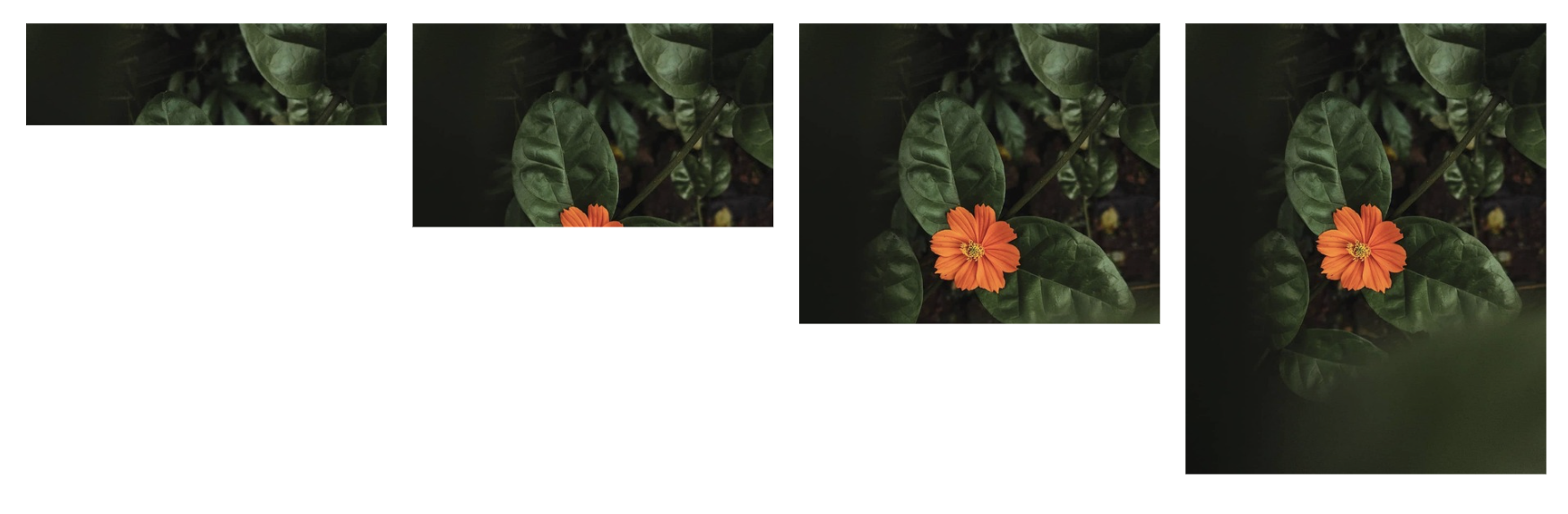
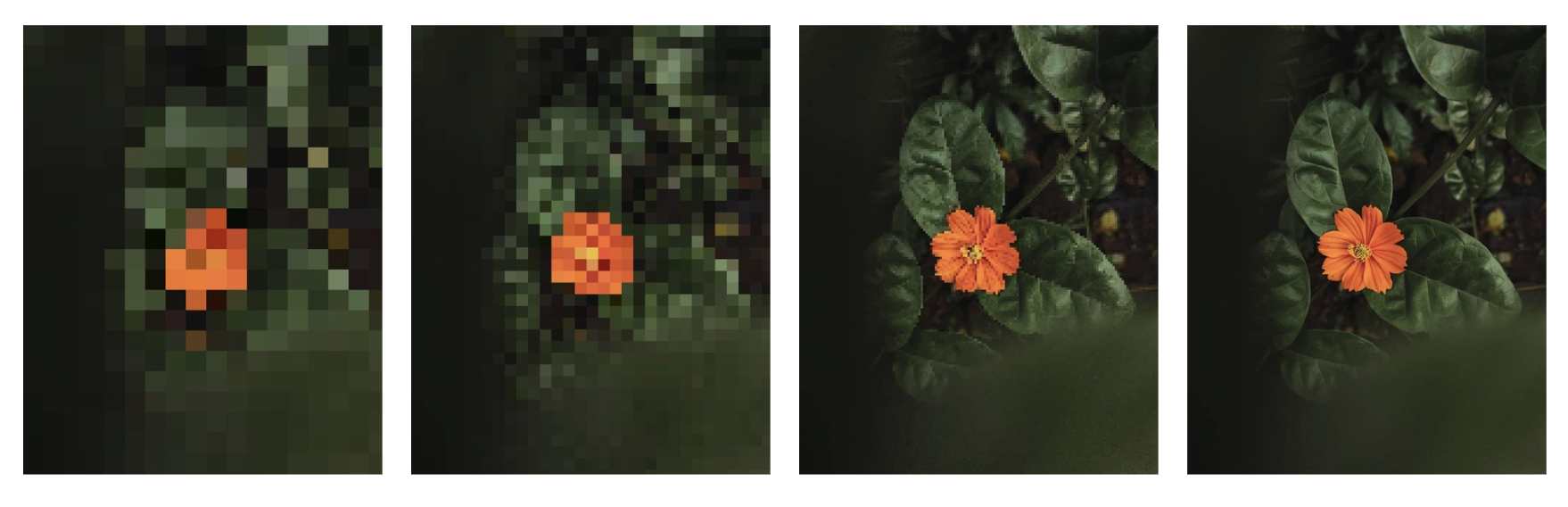
A progressive JPEG takes a different approach by loading blurry first and then sharpening. The entire image appears almost immediately as a low-quality placeholder. It then refines itself in successive passes until the full-resolution version is visible.
Spectral Selection and Successive Approximation
JPEG compression converts pixel blocks into frequency coefficients using the discrete cosine transform (DCT). You can think of this as a way to prioritize different types of visual information. Low-frequency data covers the broad strokes like the background colors and basic shapes. High-frequency data handles the fine details like the texture of a fabric or individual strands of hair.
Spectral selection deepens this concept by separating those coefficients into distinct layers. In a baseline JPEG, all coefficients for each block are stored together sequentially. In a progressive JPEG, the encoder separates them so the first scan contains only the lowest-frequency data for every block in the image. The second scan adds the next band of frequencies, and the third adds more until the full-resolution version is complete.
Progressive encoding includes a refinement technique called successive approximation, where early scans send rough versions of coefficients that get refined with more precision in later passes. Think of it like a painter blocking in shapes first, then adding detail on each pass.
The result is that after just the first scan, which is often only 10-15% of the total file, the viewer sees a recognizable and complete image. It is blurry, but it is something. That something matters more than you would think.
Why Progressive Feels Faster
Progressive JPEGs don't actually load faster. In many cases, they take the same amount of time or even marginally longer to fully decode because the browser must make multiple rendering passes instead of one. In terms of user experience, however, feeling faster is being faster.
Research on perceived performance shows that users judge loading speed by when they first see something meaningful. A progressive JPEG gives the brain a preview to latch onto immediately. The visual cortex starts processing the image content at low resolution, so by the time the sharp version arrives, the brain has already seen the image.
A baseline JPEG provides nothing until its rows start painting in. If the connection hiccups, users stare at a half-loaded photograph with a sharp line where content meets a void. While a baseline image looks broken, a progressive one looks intentional. A/B tests show this can reduce perceived page load time by 20% to 30%, which directly affects bounce rates for hero banners and above-the-fold imagery.
Progressive Is Usually Smaller
Progressive JPEGs are often smaller than their baseline equivalents at the same quality level. While encoding extra structural information and multiple scan headers adds overhead, this primarily impacts very small images. For any file over 10KB, progressive encoding tends to produce a smaller footprint due to improved entropy coding efficiency.
This efficiency comes from how the data is organized. By separating coefficients into frequency bands, the encoder groups similar values together. These clusters compress more effectively with Huffman coding. In contrast, baseline encoding interleaves all frequency bands, creating more randomness in the data stream and reducing the compression's overall effectiveness.
The resulting savings typically range from 2% to 10%. While the reduction is not massive, it represents a rare case where you improve the user experience while simultaneously decreasing the file size. There is no technical tradeoff; it is simply a more efficient way to handle web imagery.
When to Use Progressive JPEGs
Deciding between progressive and baseline encoding depends primarily on the file size and the specific role the image plays on the page.
Use progressive for:
- Hero images and large banners
- Any JPEG above roughly 10KB
- Above-the-fold imagery where first paint matters
- Photography and content-heavy pages
- Sites with a global audience on varying connection speeds
Use baseline for:
- Tiny thumbnails under 10KB (the progressive overhead actually makes them larger)
- Images that will be decoded server-side and never rendered progressively
- Very specific edge cases where decoder memory constraints matter (some embedded systems)
☞ Rule of Thumb: Progressive is the optimal default for the vast majority of web applications. While 10KB is a reliable threshold for switching to baseline, any image contributing to the initial visual impact of a site benefits from the progressive loading sequence.
Enabling Progressive in Common Encoders
Progressive JPEG is free: it costs nothing to enable, often saves a few percent in file size, and noticeably improves perceived load time for anything above about 10KB. Most encoders (libjpeg, MozJPEG, ImageMagick, Photoshop's Save for Web) expose the option; it's just frequently left off by default.